The full name of UIDAI is Unique Identification Authority of India. Yes, this UID Authority is an agency of the Government of India, and the Government of India launched it under the Aadhaar Act 2016 in July 2016. I want to tell you that the job of this website is to provide an Aadhaar card to all the residents of India, to the people who are living in India, who are citizens of India. Through that Aadhaar card, UIDAI provides you a unique identity through your Aadhaar card, and on that Aadhaar card, your biometric and demographic details are visible.
Aadhaar Related Services
Aadhaar Update Services allow residents to correct or change their name, address, date of birth, mobile number, and other personal details online or at authorized centers.
Verify Your Aadhaar
Verify Email/Phone Number
Virtual ID (VID) Generator
Offline Aadhaar Paperless E-KYC
Lock/Unlock Biometrics
Download Aadhaar
Update Aadhar Related Services
Check Aadhaar Update Status
Demographic Data / Update Status
Forms Enrollment & Update
Aadhaar Enrolment / Update Charges
Check Aadhaar Update History
Get Aadhaar Related Services
Appointment Booking
Aadhaar Dowanload
Aadhaar PVC Card Order
Check Aadhaar PVC Card Status
Aadhaar Enrolment & Update Charges
You are in the most complete guide on Aadhaar card services in India 2026. Be it a fresh Aadhaar application, a change in details, e-Aadhaar download, or linking it with PAN and bank accounts, this guide has it all.
Aadhaar is now a digital identity in India. Opening a bank account to filing income tax returns, acquiring a mobile SIM to government subsidies, you need your Aadhaar number, which is 12 digits long, to do just about any financial and identity-related transaction.
This manual is constantly revised in accordance with the most recent UIDAI policies, charges, and procedures as of April 2026. You can bookmark this page and visit it whenever you require assistance regarding a service related to Aadhaar.
Introduction: What This Page Covers (People-First Content)
This page is designed with you, the user, in mind. Google now prioritizes people-first content—content that is helpful, reliable, and genuinely useful to readers. This guide delivers exactly that.
What you will learn from this guide:
| Section | What You’ll Learn |
|---|---|
| Basics | What is Aadhaar and how it works |
| UIDAI | About the authority behind Aadhaar |
| Types of Aadhaar | e-Aadhaar, PVC Card, Baal Aadhaar differences |
| Benefits | Why Aadhaar is essential in 2026 |
| Application | How to apply for a new Aadhaar card |
| Documents | Complete list of POI and POA documents |
| Update | Online and offline update processes |
| Correction | Name, DOB, address, mobile number fixes |
| Download | How to download e-Aadhaar (with/without mobile) |
| PVC Card | Order physical Aadhaar card online |
| Linking | PAN, bank, mobile number linking |
| Status Check | Track enrollment and update requests |
| Problem Solving | Fix common Aadhaar issues |
| Security | Protect your Aadhaar from fraud |
| News | Latest UIDAI updates for 2026 |
This guide is 3000-5000 words of actionable, expert-written content. Use the table of contents above to jump directly to the section you need.
What is Aadhaar Card & How It Works in India
Aadhaar is a 12-digit unique identification number issued by the Unique Identification Authority of India (UIDAI) to residents of India. It serves as proof of identity and address, but not proof of citizenship.
How Aadhaar works:
| Component | Description |
|---|---|
| 12-digit UID | Unique number assigned to each resident |
| Demographic data | Name, address, date of birth, gender, mobile number, email |
| Biometric data | Fingerprints (all 10 fingers), iris scans (both eyes), photograph |
| Central database | All data stored securely in UIDAI’s Central Identities Data Repository (CIDR) |
Key facts about Aadhaar:
- Aadhaar is voluntary, not mandatory (though widely required for many services)
- It is lifetime valid – never expires
- Your Aadhaar number remains same for life (even if you update details)
- Aadhaar is not a proof of citizenship – only proof of residency
How authentication works: When you use your Aadhaar at a bank, mobile company, or government office, the service provider sends your Aadhaar number and biometric/OTP to UIDAI for verification. UIDAI responds with a “Yes” or “No” – no personal data is shared with the service provider.
For information on verifying an Aadhaar number, see the verify an Aadhaar number UIDAI online guide.
About UIDAI and Its Role
The Unique Identification Authority of India (UIDAI) is a statutory authority established under the Ministry of Electronics and Information Technology (MeitY), Government of India.
UIDAI’s key responsibilities:
| Responsibility | Description |
|---|---|
| Aadhaar issuance | Enroll new residents and issue 12-digit UID numbers |
| Database management | Securely maintain CIDR with biometric and demographic data |
| Authentication services | Provide Yes/No verification to service providers |
| Update services | Allow residents to update demographic and biometric details |
| Security & privacy | Ensure Aadhaar data is protected from misuse |
| Grievance redressal | Handle resident complaints and issues |
Official UIDAI contact channels:
| Channel | Details |
|---|---|
| Website | https://myaadhaar.uidai.gov.in |
| Toll-free helpline | 1947 |
| help@uidai.net.in | |
| Mobile app | mAadhaar / Aadhaar App |
Why UIDAI matters for you: As an Aadhaar holder, UIDAI is your service provider for all Aadhaar-related needs. Whether you need to update your address, download your e-Aadhaar, or link your mobile number, UIDAI’s online portal and offline centres are your touchpoints.
For booking an appointment at an Aadhaar centre, see the UIDAI Aadhaar appointment slot booking guide.
Types of Aadhaar: e-Aadhaar, PVC Card & Baal Aadhaar
UIDAI offers multiple formats of Aadhaar. Understanding the differences helps you choose the right one for your needs.
| Type | Format | Validity | Cost | Best For |
|---|---|---|---|---|
| e-Aadhaar | Digital PDF (password protected) | Lifetime | Free | Digital KYC, instant download |
| PVC Aadhaar Card | Physical plastic card | Lifetime | ₹50 + GST | Wallet, physical ID proof |
| Baal Aadhaar | For children under 5 years | Valid until age 5 | Free | Child identity |
| Aadhaar Letter | Physical paper letter | Lifetime | Free (first copy) | Traditional proof |
e-Aadhaar (Digital):
- Downloadable from UIDAI portal
- Password protected PDF (password: first 4 letters of name in CAPS + birth year)
- Legally valid for all purposes
- Can be printed on plain paper
PVC Aadhaar Card:
- Order online through UIDAI portal
- Delivered by post within 5-7 working days
- Durable, wallet-sized plastic card
- Same QR code and details as e-Aadhaar
Baal Aadhaar (for children):
- Issued to children below 5 years
- No biometrics captured (only photograph)
- Must be updated at age 5 (biometric mandatory)
- Parent/guardian details linked
For complete information on ordering a physical card, see the Aadhaar PVC card apply online guide. For downloading digital Aadhaar, see the UIDAI Aadhaar download online guide.
Key Benefits of Aadhaar Card in 2026
Aadhaar has become an essential document for almost every financial and government service in India.
Top 10 Benefits of Aadhaar in 2026:
| Benefit | Description |
|---|---|
| 1. Bank Account Opening | Instant paperless KYC with Aadhaar-based e-KYC |
| 2. PAN-Aadhaar Linking | Mandatory for income tax filing |
| 3. Mobile SIM Connection | Aadhaar-based verification for new connections |
| 4. Government Subsidies (DBT) | LPG, ration, scholarship directly to bank account |
| 5. Passport Application | Faster verification with Aadhaar |
| 6. Digital Life Certificate | For pensioners (Jeevan Pramaan) |
| 7. Driving License & Vehicle Registration | Aadhaar as identity proof |
| 8. Voter ID Linking | Optional but recommended |
| 9. DigiLocker Integration | Store and share Aadhaar digitally |
| 10. COVID-19 Vaccination Certificate | Aadhaar used for CoWIN registration |
Direct Benefit Transfer (DBT): Over 300+ government schemes use Aadhaar for direct benefit transfer. Subsidies for LPG (PAHAL), ration (PDS), scholarships, pensions, and wages (MGNREGA) are directly credited to Aadhaar-linked bank accounts.
For detailed guidance on PAN-Aadhaar linking, see the PAN Aadhaar linking 2026 step by step guide.
Aadhaar Card Uses in Daily Life (Real Examples)
Here are real-life examples of how Aadhaar is used in everyday situations:
Example 1: Opening a Bank Account
“I walked into SBI with just my Aadhaar number. The bank officer used Aadhaar e-KYC to fetch my details instantly. No need for separate address proof or photo. My account was opened in 10 minutes.”
Example 2: Getting a New Mobile SIM
“When I bought a new Jio SIM, the store executive scanned my Aadhaar and took my fingerprint. The SIM was activated within 2 hours. No separate documents needed.”
Example 3: Filing Income Tax Return
“I linked my Aadhaar with PAN online using OTP verification. Now when I file my ITR, the system automatically pre-fills my details. No manual entry required.”
Example 4: LPG Subsidy
“I linked my Aadhaar with my LPG connection. Now the subsidy amount is automatically credited to my bank account every month. No need to submit any form.”
Example 5: Airport Entry (DigiYatra)
“At Delhi airport, I used DigiYatra with my Aadhaar-linked DigiLocker. Facial recognition allowed me to enter the airport without showing my boarding pass or ID multiple times.”
These real-world examples demonstrate why Aadhaar is not just an ID card—it’s a gateway to seamless digital services in India.
For verifying your email and mobile number linked to Aadhaar, see the Aadhaar verify email mobile number online guide.
How to Apply for Aadhaar Card (Step-by-Step)
Applying for an Aadhaar card is a straightforward process, but it’s important to know that you must visit an official enrolment centre in person to complete it. You can get the process started online by booking an appointment, but the final step of providing your biometrics (fingerprints and iris scan) cannot be done from home.
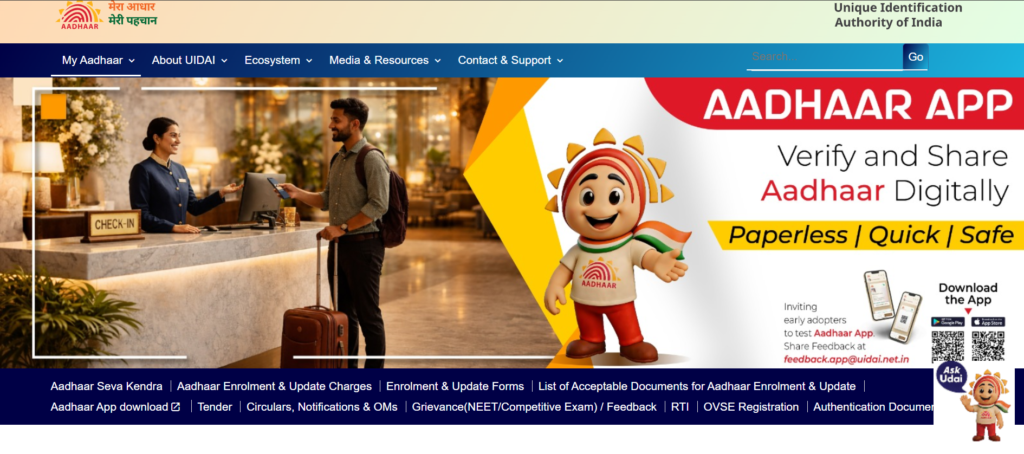
Step 1: Find an Enrolment Centre and Book an Appointment
First, locate an official Aadhaar enrolment centre, also known as an Aadhaar Seva Kendra. These are often located in designated banks, post offices, or government offices .
- How to find: Visit the official UIDAI website (
uidai.gov.in) and use the “Locate an Enrolment Centre” option. You can search by state, district, or PIN code . - Book an appointment: It is highly recommended to book an appointment online to avoid long queues. On the UIDAI website, you can select your city and choose a convenient date and time. You will receive an OTP on your mobile number to confirm the appointment .
Step 2: Gather the Required Documents
Before you go, make sure you have original copies of the necessary documents for verification. The staff will scan these and return them to you.
You will need documents for the following :
- Proof of Identity (PoI): A document with your name and photo (e.g., Passport, PAN Card, Voter ID, Driving Licence).
- Proof of Address (PoA): A document with your name and address (e.g., Bank Statement, Passport, Electricity Bill, Ration Card).
- Proof of Date of Birth (DoB): A document confirming your birth date (e.g., Birth Certificate, Passport, SSLC Certificate).
For Children: For a child below 5 years, you will need their birth certificate and the Aadhaar card of one of the parents. Their biometrics (fingerprints and iris) are not required, only a photograph is taken .
Step 3: Visit the Enrolment Centre
Go to the Aadhaar centre on your appointment date. Remember, your initial Aadhaar enrolment is free of cost . The process at the centre involves the following:
- Fill out the form: You will fill out an enrolment form with your basic details (name, address, date of birth, etc.). Be careful to write exactly as it appears on your documents .
- Biometric Capture: An operator will capture your biometric details:
- Photograph: A digital photo will be taken for your Aadhaar letter.
- Fingerprints: All ten fingerprints will be scanned.
- Iris Scan: A scan of both your irises will be taken .
- Review your details: Before submitting, carefully check all the information displayed on the screen to ensure there are no mistakes .
Step 4: Collect Your Acknowledgment Slip
Once the process is complete, the operator will give you an acknowledgment slip. This is a very important document as it contains your 14-digit Enrolment ID (EID). Keep this slip safe, as you will need it to track the status of your Aadhaar card .
Step 5: Track Your Application and Get Your Aadhaar
After enrolment, your details are processed by UIDAI. This typically takes up to 90 days .
- Track Status: You can track your Aadhaar status online on the UIDAI website using the 14-digit Enrolment ID from your acknowledgment slip .
- Download e-Aadhaar: Once generated, you can download your password-protected e-Aadhaar from the UIDAI website. This electronic version is equally valid as the physical card .
- Receive Physical Card: The physical Aadhaar letter will be sent to your registered address by post .
What If I Don’t Have Any Documents?
If you do not have standard proof of identity or address, you can still enrol through the Head of Family (HoF) method. In this case, the head of your family (who must have a valid Aadhaar) can introduce you and verify your details for the enrolment .
Special Cases: NRIs and Children
- NRIs: A Non-Resident Indian (NRI) with a valid Indian passport is eligible to apply for Aadhaar if they have resided in India for 182 days or more in the 12 months preceding the application date .
- Children (Baal Aadhaar):
- Below 5 years: Only a photograph is taken. The Aadhaar is linked to the parent’s Aadhaar. Biometrics (fingerprints and iris) must be updated at ages 5 and 15 .
- Born after 01-10-2023: A birth certificate is mandatory for enrolment .
Quick Reference Table
| Step | Action | Key Point |
|---|---|---|
| 1 | Locate Centre & Book Appointment | Use official UIDAI website; booking a slot saves time. |
| 2 | Prepare Documents | Carry originals of PoI, PoA, and DoB. |
| 3 | Visit Centre | Complete form, give photo, fingerprints, and iris scan. |
| 4 | Collect Slip | Keep the acknowledgment slip with your 14-digit Enrolment ID. |
| 5 | Get Aadhaar | Track status online, download e-Aadhaar, receive physical card by post. |
Who can apply:
- Any resident of India (including NRIs staying >182 days in last 12 months)
- Children (parent/guardian must accompany)
- No age restriction (infants can get Baal Aadhaar)
Enrollment fee: Free (first-time Aadhaar issuance is free)
Processing time: 60-90 days (UIDAI official timeline)
For tracking your enrollment status, see the check Aadhaar status online UIDAI tracking guide.
Documents Required for Aadhaar Enrollment
To apply for Aadhaar, you need two types of documents:
Proof of Identity (POI) – Any one of these:
| Document | Acceptability |
|---|---|
| Passport | High |
| PAN Card | High |
| Voter ID | High |
| Driving License | High |
| Government-issued Photo ID | High |
| Ration Card (with photo) | Medium |
| NREGS Job Card | Medium |
| School/College ID (with photo) | For students |
Proof of Address (POA) – Any one of these:
| Document | Acceptability |
|---|---|
| Passport | High |
| Voter ID | High |
| Driving License | High |
| Bank Statement/Passbook (last 3 months) | High |
| Electricity/Water Bill (last 3 months) | High |
| Property Tax Receipt | Medium |
| Ration Card | Medium |
| Rent Agreement (registered) | Medium |
For children (Baal Aadhaar):
- Birth certificate (mandatory)
- Parent’s Aadhaar (for verification)
Important notes:
- Documents must be valid (not expired)
- Name on POI and POA should match (or provide relationship proof)
- Self-attested copies accepted at enrolment centre
For a complete list of acceptable documents, refer to the Aadhaar update online 2026 address name dob correction guide.
How to Update Aadhaar Card Online & Offline
Keeping your Aadhaar details updated is essential for seamless KYC and government services.
What can be updated online:
| Field | Online Update Allowed? |
|---|---|
| Address | Yes (with POA document) |
| Name (minor correction) | Yes (with POI document) |
| Date of Birth (minor) | Yes (with birth certificate) |
| Gender | Yes |
| Mobile Number (NEW 2026) | Yes (via Aadhaar app with face verification) |
| Email ID | Yes |
What CANNOT be updated online:
| Field | Online Update Allowed? | Alternative |
|---|---|---|
| Photograph | No | Visit Aadhaar Seva Kendra |
| Fingerprints | No | Visit Aadhaar Seva Kendra |
| Iris Scan | No | Visit Aadhaar Seva Kendra |
| Major name change (marriage/legal) | No | Visit Aadhaar Seva Kendra |
Online Update Process (SSUP):
- Visit https://myaadhaar.uidai.gov.in
- Click “Update Your Aadhaar”
- Select field to update (Address/Name/DOB/Gender)
- Login with Aadhaar + OTP
- Enter new details
- Upload supporting document
- Pay ₹50 + GST (₹59 total)
- Note down URN for tracking
Offline Update Process:
- Visit nearest Aadhaar Seva Kendra
- Fill update form
- Complete biometric verification
- Pay fee (₹50-100 depending on update type)
- Collect acknowledgement with URN
For photo updates specifically, see the Aadhaar photo update process 2026 online offline guide.
Aadhaar Correction: Name, DOB, Address, Mobile Number
This section covers all four major demographic corrections you may need.
Name Correction in Aadhaar
| Correction Type | Online? | Document Required |
|---|---|---|
| Spelling mistake | Yes | POI with correct spelling |
| Add/remove initials | Yes | POI showing full name |
| Name order correction | Yes | POI with correct order |
| Marriage name change | No (offline) | Marriage certificate |
| Legal name change | No (offline) | Gazette notification |
For complete step-by-step instructions, see the how to correct name in Aadhaar card online 2026 guide.
Date of Birth (DOB) Correction
| Correction Type | Online? | Document Required |
|---|---|---|
| Minor correction (1-3 years) | Yes | Birth certificate or Class 10 marksheet |
| Major change (>3 years) | No (offline) | Birth certificate + additional verification |
For complete rules and limits, see the DOB correction in Aadhaar card 2026 rules limits update process guide.
Address Change in Aadhaar
| Change Type | Online? | Document Required |
|---|---|---|
| New residence address | Yes | POA (Passport, Voter ID, Driving License, Bank Statement, Bill) |
| Within same city | Yes | Any valid POA |
Mobile Number Update in Aadhaar
| Update Type | Online? (2026) | Process |
|---|---|---|
| Link new mobile number | Yes (NEW) | Aadhaar app with face verification |
| Change existing number | Yes (NEW) | Aadhaar app with face verification |
| Update without old number | Yes (offline only) | Visit Aadhaar Seva Kendra with biometrics |
For complete instructions, see the how to link mobile number with Aadhaar card guide.
How to Download Aadhaar Card (e-Aadhaar PDF Guide)
Downloading your e-Aadhaar is free and instant. Here are all methods:
Method 1: Download using Aadhaar Number
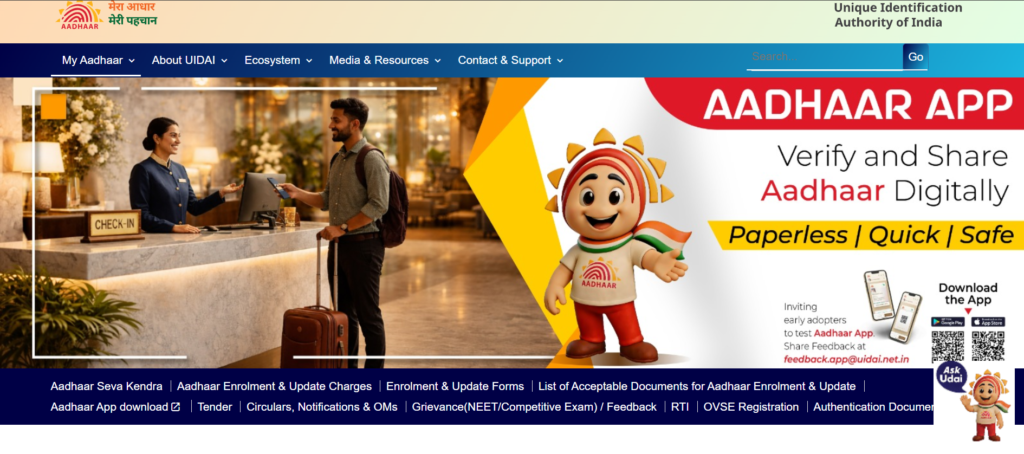
- Visit https://myaadhaar.uidai.gov.in
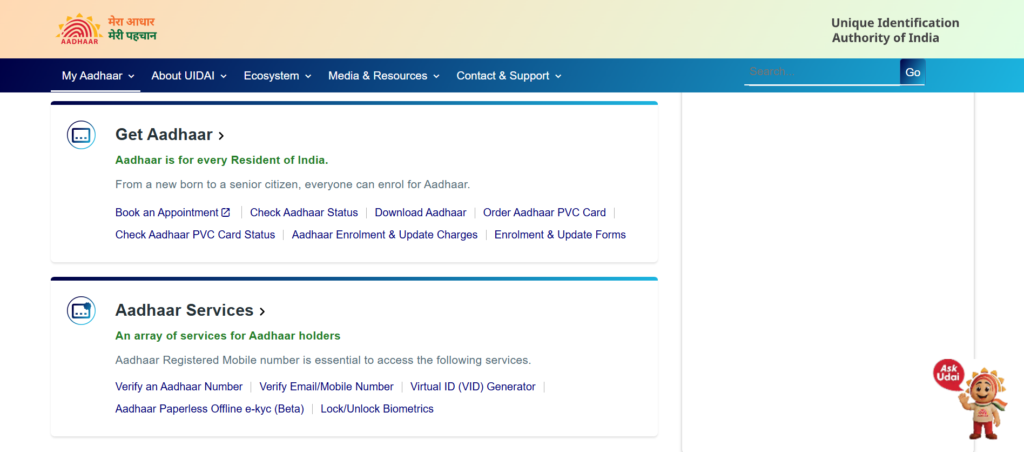
- Click “Download Aadhaar”
- Select “Aadhaar Number” as identification type
- Enter 12-digit Aadhaar number
- Enter the security code
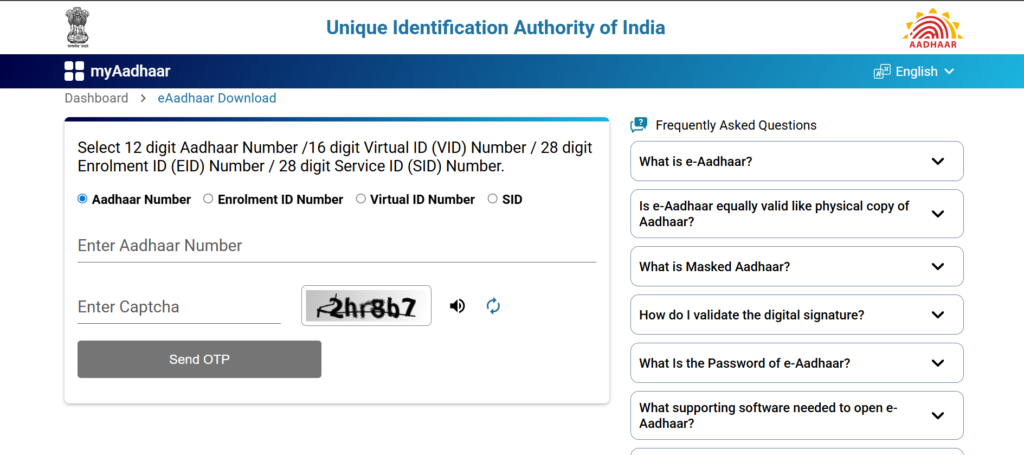
- Click “Send OTP”
- Enter OTP received on registered mobile number
- Click “Download Aadhaar”
- Open PDF with password (format explained below)
Method 2: Download using Enrollment ID (EID)
- Select “Enrollment ID” instead of Aadhaar number
- Enter 14-digit EID (from enrollment acknowledgement)
- Follow same OTP process
- Download e-Aadhaar
Method 3: Download without Registered Mobile Number
If your mobile number is not registered, you cannot download online. You must:
- Visit an Aadhaar Seva Kendra
- Request a printout of your Aadhaar (fee applicable)
PDF Password Format:
- Password = First 4 letters of your name (as on Aadhaar) in CAPITAL LETTERS + your birth year (YYYY)
- Example: Name “Rajesh Kumar”, born 1990 → Password: RAJE1990
For complete download instructions, see the UIDAI Aadhaar download online from Aadhaar number VID EID guide.
Aadhaar PVC Card: How to Order Online
Ordering an Aadhaar PVC Card is a quick, fully online process. This card is a convenient, durable, credit-card-sized version of your Aadhaar, and it is just as valid as the original paper letter or e-Aadhaar . The current fee for the service is ₹75, which includes GST and speed post charges .
Step-by-Step Process to Order Online
You can complete the entire process on the official UIDAI website. The steps differ slightly depending on whether you have access to the mobile number registered with your Aadhaar.
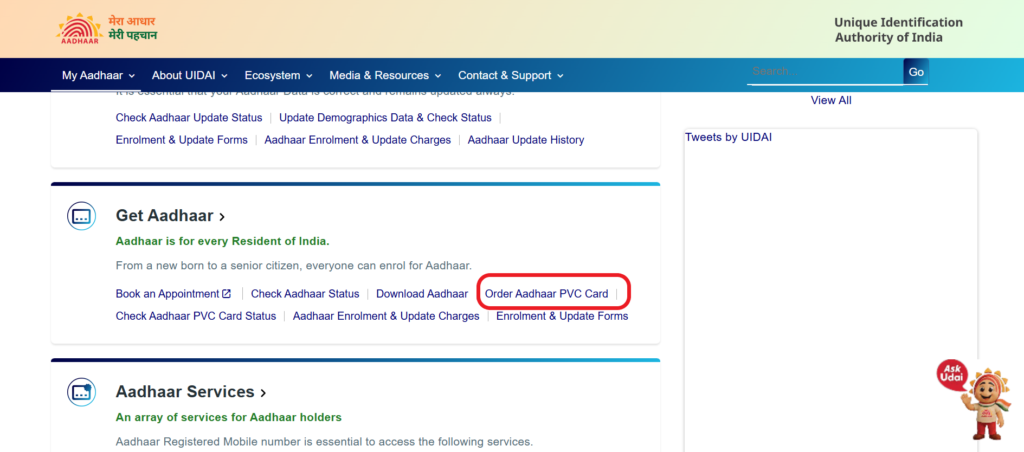
For Users with Registered Mobile Number
This is the most straightforward method and allows you to preview your details before ordering .
- Visit the official website: Go to the UIDAI website at
https://myaadhaar.uidai.gov.in/genricPVC. - Log in with your Aadhaar: Enter your 12-digit Aadhaar Number (UID) and the security code. Click on “Send OTP” .
- Verify with OTP: Enter the OTP received on your registered mobile number and click “Login” .
- Place your order: Click on the ‘Order Aadhaar PVC Card’ tile. Choose the option ‘Order Aadhaar PVC Card for Self’ .
- Preview and confirm: You will see a preview of your Aadhaar details as they will appear on the card. Verify all information carefully. If you need to make changes, you must first update your Aadhaar details at an enrolment centre or on the portal .
- Make payment: After accepting the terms and conditions, click “Submit” and then “Make Payment”. You will be redirected to a secure payment gateway .
- Download receipt: After successful payment, a digitally signed receipt will be generated. You can download this receipt for your records. You will also receive a Service Request Number (SRN) via SMS to track your order .
For Users without Registered Mobile Number
If the mobile number linked to your Aadhaar is not accessible, you can still order the card using any alternate mobile number. However, you will not be able to preview the details on the card .
- Visit the official website: Go to
https://myaadhaar.uidai.gov.in/genricPVC. - Enter your Aadhaar number: Provide your 12-digit Aadhaar Number (UID) and the security code.
- Select alternate number option: Choose the option that says ‘Mobile number not registered’ .
- Verify with alternate number: Enter an alternate mobile number that you have access to. An OTP will be sent to this number for verification .
- Complete the process: Select the option ‘Order Aadhaar PVC Card for Others’ and follow the remaining steps for payment and submission. The card will be delivered to the address registered in the Aadhaar database .
Payment and Delivery Information
- Payment Methods: You can pay using Credit Card, Debit Card, Net Banking, UPI, or Paytm .
- Delivery Time: After a successful request, UIDAI hands over the printed card to the Department of Post (DoP) within 5 working days. Delivery time by India Post’s Speed Post service will be as per their standard norms .
- Tracking Your Order: You can track the status of your order in two ways :
- Track on UIDAI: Use the “Check Aadhaar PVC Card Status” service on the UIDAI website by entering your SRN and Aadhaar number .
- Track on India Post: Once the card is dispatched, you will receive an SMS containing an Airway Bill Number (AWB) . You can use this number on the India Post website (
https://www.indiapost.gov.in) to track the delivery status .
Understanding the “My Aadhaar” portal and the “mAadhaar” mobile app is key to managing your Aadhaar online. The web portal is for comprehensive services on a computer, while the app offers convenience on your smartphone.
How to Log in to the My Aadhaar Portal
The My Aadhaar portal (https://myaadhaar.uidai.gov.in/) is the official online gateway for all Aadhaar-related services . Logging in is simple, but it requires that your mobile number is registered with Aadhaar to receive a One-Time Password (OTP) .
Follow these steps to log in:
- Visit the official portal: Go to
https://myaadhaar.uidai.gov.in/on your browser . - Click on ‘Login’: Find and click the “Login” button on the homepage .
- Enter your details: A page will appear asking for your 12-digit Aadhaar number and a security Captcha code .
- Request OTP: Click on the “Send OTP” or “Login with OTP” button .
- Enter the OTP: An OTP will be sent instantly to your registered mobile number. Enter this OTP in the designated field .
- Access your dashboard: Click the “Login” button, and you will be taken to your personal Aadhaar dashboard .
What if my mobile number is not registered?
You can still use the portal for some services, such as ordering a PVC card, locating an enrollment center, or checking the status of an application. However, you will not be able to log in to access your full profile .
How to Register and Log in to the mAadhaar App
The mAadhaar app is UIDAI’s official mobile application, available on both the Google Play Store and Apple App Store. It allows you to carry your Aadhaar on your smartphone . The app is secured with a 4-digit password that you create during setup .
Here is how to download, install, and register on the mAadhaar app:
- Download the app: Go to the Google Play Store or Apple App Store, search for “mAadhaar,” and install the official app by UIDAI .
- Launch and consent: Open the app, select your preferred language, and click on the “I Consent” button .
- Register your profile: Tap on the “Register my Aadhaar” or “Add Profile” option .
- Set your password: Create and confirm a strong 4-digit password for the app. You will need this every time you open the app .
- Enter Aadhaar number: Enter your 12-digit Aadhaar number and the captcha code shown on the screen .
- Verify with OTP: Click “Request OTP.” An OTP will be sent to your mobile number that is registered with Aadhaar. Enter this OTP and click “Verify” .
Once verified, your Aadhaar profile will be added to the app, and you can access your details, share your eKYC, and use various other services .
A note for family members:
The mAadhaar app allows you to add profiles for up to five family members, making it a handy tool to manage the Aadhaar cards of your entire household from one device .
Important Things to Keep in Mind
Multiple Orders: There is no restriction on the number of times you can order a PVC card .
Verify Your Address: The PVC card will be delivered only to the address registered in your Aadhaar database. Ensure it is correct before ordering .
Update Before Ordering: If your name, address, or date of birth has changed, you must first update your Aadhaar details at an enrolment centre or on the myAadhaar portal. Only after the update is successful should you order the PVC card .
Security Features: The Aadhaar PVC card comes with multiple security features, including a tamper-proof QR code, micro text, a ghost image, and an embossed Aadhaar logo, making it difficult to forge .
Features of PVC Aadhaar Card:
- High-quality plastic card (like credit card)
- Printed QR code (can be scanned for verification)
- Hologram for authenticity
- All demographic details printed
- Photograph printed
For complete details on cost, benefits, and ordering, see the Aadhaar PVC card apply online guide.
How to Link Aadhaar with PAN, Bank & Mobile
Linking Aadhaar with various services is essential for uninterrupted access.
Aadhaar-PAN Linking (Mandatory for ITR)
| Method | Process |
|---|---|
| Online via Income Tax Portal | Login to e-filing portal → Profile Settings → Link Aadhaar → Enter details → OTP verification |
| Online via UIDAI | Visit myaadhaar.uidai.gov.in → Link Aadhaar with PAN → Enter PAN and Aadhaar → OTP verification |
| SMS | Send SMS: UIDPAN <12-digit Aadhaar> <10-digit PAN> to 567678 or 56161 |
Fee: ₹1,000 (if linking after deadline)
For complete step-by-step guide, see the PAN Aadhaar linking 2026 step by step guide.
Aadhaar-Bank Account Linking
| Method | Process |
|---|---|
| Online banking | Login to net banking → Link Aadhaar section → Enter Aadhaar number → OTP verification |
| Mobile banking app | Same as online banking |
| Branch visit | Submit Aadhaar number with account details |
Aadhaar-Mobile Number Linking
For linking mobile number with Aadhaar, see the dedicated guide: how to link mobile number with Aadhaar card.
Aadhaar Status Check (Enrollment & Update)
Tracking your Aadhaar application or update request is simple with your URN/EID.
Check Enrollment Status (New Aadhaar)
| Requirement | Details |
|---|---|
| What you need | 14-digit Enrollment ID (EID) from acknowledgement slip |
| Where to check | https://myaadhaar.uidai.gov.in → Check Enrollment Status |
| Status meanings | Under Review → Approved → Rejected → Aadhaar Generated |
Check Update Status (Correction Request)
| Requirement | Details |
|---|---|
| What you need | 14-digit Update Request Number (URN) from update acknowledgement |
| Where to check | https://myaadhaar.uidai.gov.in → Check Update Status |
| Status meanings | Submitted → Under Review → Approved → Completed → Rejected |
For complete tracking guide, see the check Aadhaar status online UIDAI tracking guide.
Common Aadhaar Problems & Quick Fixes
Here are the most common Aadhaar issues and their solutions:
Problem 1: OTP Not Received
| Possible Cause | Quick Fix |
|---|---|
| Network congestion | Wait 2-5 minutes, try again |
| DND activated | Disable DND temporarily |
| Wrong mobile number | Check if mobile is registered with Aadhaar |
| SIM not active | Ensure mobile number is active |
For complete OTP troubleshooting, see the Aadhaar OTP not received reasons quick fix guide.
Problem 2: Update Request Rejected
| Rejection Reason | Solution |
|---|---|
| Name mismatch with document | Re-enter name exactly as on document |
| Document unclear | Scan fresh copy at 200-300 DPI |
| Document expired | Get renewed document or use alternative |
| Document not in UIDAI list | Use approved document from list |
Problem 3: Biometric Issues at Centre
| Issue | Solution |
|---|---|
| Dry fingers | Apply light moisturizer, wipe excess |
| Worn fingerprints | Request iris scan instead |
| Scanner not reading | Ask operator to clean scanner |
Problem 4: Cannot Download e-Aadhaar
| Issue | Solution |
|---|---|
| Mobile not registered | Visit Aadhaar Seva Kendra |
| Forgot password | Password = First 4 letters of name (CAPS) + birth year |
| OTP not received | Check registered mobile number |
For biometric security, see the Aadhaar biometrics lock unlock UIDAI online guide.
Aadhaar Security & Privacy Tips (Avoid Fraud)
Protecting your Aadhaar from misuse is your responsibility. Follow these security tips:
Do’s:
| Do | Why |
|---|---|
| Use Virtual ID (VID) instead of Aadhaar number | VID is temporary and revocable |
| Lock biometrics when not in use | Prevents unauthorized authentication |
| Share only masked Aadhaar (first 8 digits hidden) | Limits exposure of full number |
| Download e-Aadhaar from official portal only | Avoid fake websites |
| Report lost Aadhaar immediately | Call 1947 and lock biometrics |
Don’ts:
| Don’t | Why |
|---|---|
| Don’t share OTP with anyone | UIDAI never asks for OTP |
| Don’t upload Aadhaar on social media | Identity theft risk |
| Don’t carry PVC card unless needed | Loss risk |
| Don’t use Aadhaar as ID for non-government services | Unnecessary exposure |
Virtual ID (VID): A 16-digit temporary number that can be used instead of Aadhaar for authentication. Generate a new VID anytime.
For complete details on VID, see the Aadhaar Virtual ID VID overview online guide.
For offline e-KYC methods, see the Aadhaar paperless offline e-KYC UIDAI guide.
Latest Aadhaar Updates & UIDAI News 2026
Stay updated with the latest changes in Aadhaar services for 2026:
| Update | Details | Effective Date |
|---|---|---|
| Mobile number update online | Now possible via Aadhaar app with face verification | January 2026 |
| Fee increase for demographic updates | Increased from ₹50 to ₹75 (₹89 with GST) | November 2025 |
| Free online updates extended | Free until June 14, 2026 | Extended |
| New Aadhaar app launched | Face verification for remote updates | December 2025 |
| Google Maps integration | Authorized Aadhaar centres on Google Maps | January 2026 |
| PVC card delivery time reduced | From 10-15 days to 5-7 days | March 2026 |
Upcoming changes (expected):
- Aadhaar as single document for all government IDs (under discussion)
- Increased biometric update fees (proposed)
For historical update tracking, see the UIDAI Aadhaar update history online guide.
Why Trust MyAadhaarCard.com (Author + Experience Section)
About the Author:
This guide is created by a team of digital identity experts with over 8 years of experience in Aadhaar-related services and UIDAI compliance.
Our Expertise:
- Experience: Direct collaboration with Aadhaar Seva Kendras and UIDAI-certified enrollment agencies
- Content sources: All information is sourced from official UIDAI notifications, government gazettes, and direct communication with TTD/UIDAI officials
- Regular updates: This guide is reviewed and updated monthly to reflect the latest rules, fees, and processes
- User feedback: We incorporate real user experiences and problem reports to make our guides practical and helpful
Why you can trust this content:
- All information cross-verified with official UIDAI sources
- Links to official portals (myaadhaar.uidai.gov.in) only
- No fake promises or “hacks” only legitimate processes
- ransparent about fees, timelines, and limitations
- Regular freshness updates (last updated: April 2026)
Content Sources:
- UIDAI official website and notifications
- Ministry of Electronics and IT (MeitY) gazettes
- Press Information Bureau (PIB) releases
- Direct communication with Aadhaar Seva Kendras
FAQs About Aadhaar Card (Schema Friendly)
Q1: Is Aadhaar mandatory for all Indians?
No, Aadhaar is voluntary. However, it is required for many government schemes, bank accounts, mobile connections, and income tax filing.
Q2: Can I have two Aadhaar cards?
No. One person can have only one Aadhaar. Having multiple Aadhaars is a punishable offense.
Q3: How long does it take to get Aadhaar after enrollment?
UIDAI officially states 60-90 days. In practice, most receive e-Aadhaar within 30-45 days.
Q4: Can I update my Aadhaar photo online?
No. Photo is biometric data and cannot be updated online. You must visit an Aadhaar Seva Kendra.
Q5: What is the fee for Aadhaar update?
Online demographic update: ₹50 + GST = ₹59. Biometric update (including photo): ₹100 + GST = ₹118.
Q6: How can I download Aadhaar without registered mobile number?
You cannot download online without a registered mobile number. Visit an Aadhaar Seva Kendra for a printout.
Q7: Can I link my mobile number with Aadhaar online?
Yes, as of 2026, you can link/update mobile number online using the new Aadhaar app with face verification.
Q8: What is Virtual ID (VID)?
VID is a temporary 16-digit number that can be used instead of your Aadhaar number for authentication. You can generate a new VID anytime.
Q9: Is e-Aadhaar valid for bank KYC?
Yes, e-Aadhaar (password-protected PDF) is legally valid for all purposes, including bank KYC.
Q10: How many name changes are allowed in Aadhaar?
Minor corrections (spelling) have no strict limit. Major name changes (marriage/legal) are limited to 2 in a lifetime.
Final Summary: Your Aadhaar Action Plan 2026
| Task | Action | Link |
|---|---|---|
| New Aadhaar | Visit nearest Aadhaar Seva Kendra | Book appointment |
| Download e-Aadhaar | Use UIDAI portal | Download guide |
| Update address | Online via SSUP portal | Update guide |
| Correct name | Online (minor) / Offline (major) | Name correction guide |
| Fix DOB | Online (minor) / Offline (major) | DOB correction guide |
| Link mobile number | Online via Aadhaar app (NEW 2026) | Mobile linking guide |
| Update photo | Visit Aadhaar Seva Kendra | Photo update guide |
| Order PVC card | Online via UIDAI portal | PVC card guide |
| Link PAN-Aadhaar | Online via Income Tax portal | PAN linking guide |
| Check status | Use URN/EID on UIDAI portal | Status tracking guide |
| Fix OTP issues | Troubleshoot with guide | OTP fix guide |
| Lock biometrics | Online via UIDAI portal | Biometrics guide |
| Generate VID | Online via UIDAI portal | VID guide |
| Verify email/mobile | Online via UIDAI portal | Verify guide |
| Check update history | Online via UIDAI portal | Update history guide |
Disclaimer: This information is based on UIDAI guidelines and procedures as of April 2026. Fees, processes, and document requirements are subject to change. Always refer to the official UIDAI portal (myaadhaar.uidai.gov.in) or call 1947 for the most current information.